2:28:11 AM

Optimizing app onboarding for new and current ShopBack users

Industry

Ecommerce

Ecommerce

Client

ShopBack

ShopBack

Timeline

4 Months

4 Months

Services

UXUI, User research

UXUI, User research

Main Project Image

Background & Challenge

Background & Challenge

Background & Challenge

About ShopBack

ShopBack is a shopping & discovery platform in APAC. Our mission is simple: We live to create winning shopping experiences for our users and partners alike.

  • 10 markets + Germany in 2023

  • 38M users

  • 15,000 merchant partners

  • 1 million shopping trips every day

  • US$3.7B annual sales

Key Benefits of using ShopBack

  • Find deals 🔍
    Check for discounts and rewards at stores and for Vouchers.

  • Pay with ease 💳
    Buy online or in-store, with e-payment and buy now pay later options.


  • Get Cashback 🤑
    Receive a slice of the commission we earn from our partners.


This landscape is competitive and ever changing.

While there are new platforms introducing new features to improve the shopping journey, there some who are constantly adapting to this vastly fast moving landscape of competition and user’s shopping behaviours in order to win customers.
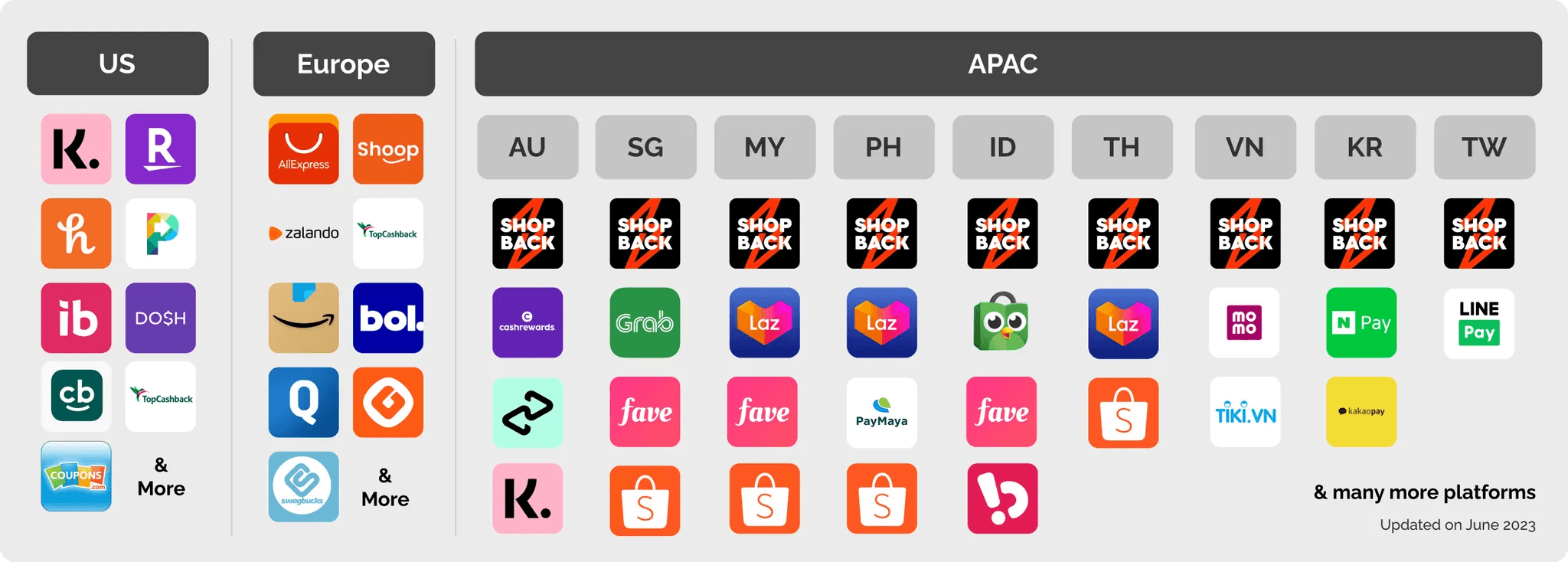

Why are focusing on this specific problem space now?

  • ShopBack wants to continue scaling in new markets. We need to find a scalable way to educate users on how ShopBack works and would benefit new users, even as we scale.

  • But user drop off has always been unstable. While ShopBack has been running for close to 8 years now, in the recent user testing on new users, users exclaimed they found the app confusing and “unsure where to start”.

Opportunity

Opportunity

Opportunity

Two key challenges

  1. We had no consistent way to create user education content across different markets. Therefore, there is no controlled way to measure performance or iterate on improvements.
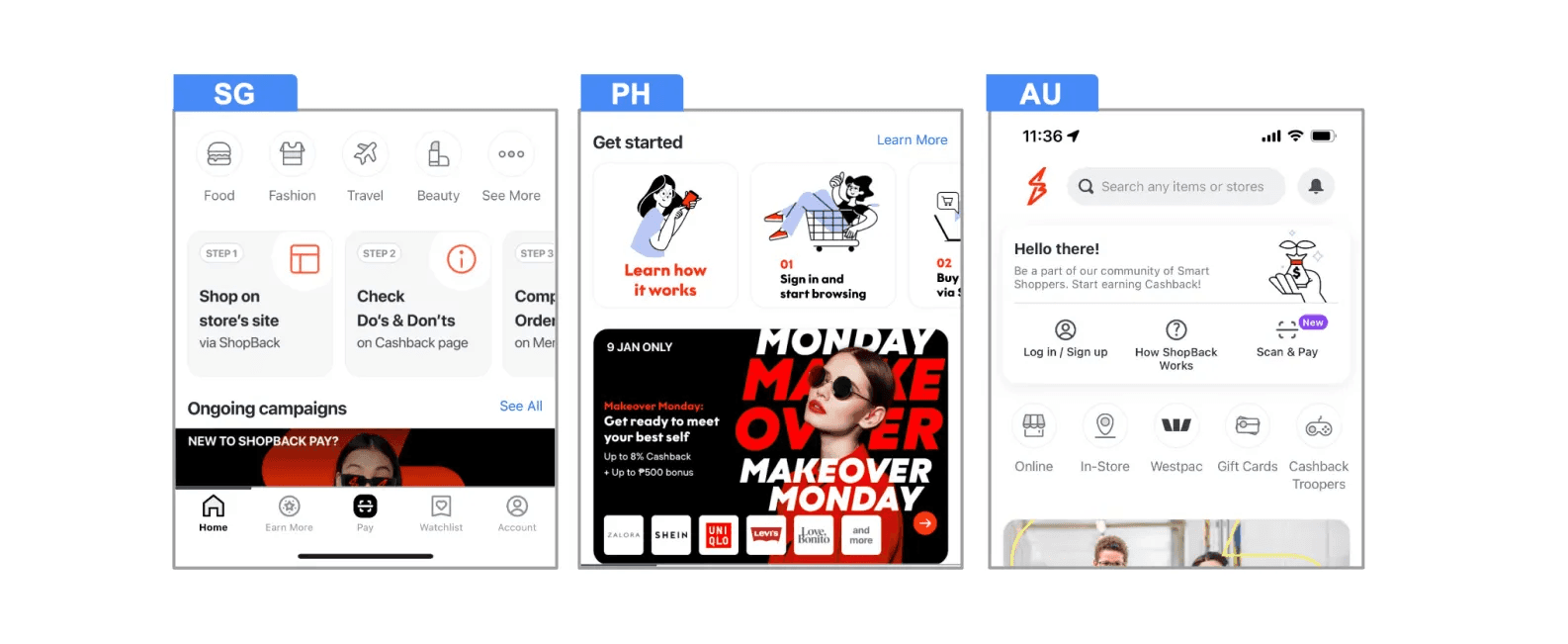
  1. We had no way to understand the user's intention of signing up on ShopBack. Therefore, all users go through the same steps when they sign up on ShopBack, even when it is irrelevant to their intent.
Approach

Approach

Approach

Run three experiments to increase user engagement and educate users on ShopBack’s features

Experiment 1: Collect user’s intent to show relevant flows dynamically

Hypothesis

Showing relevant screens based on user’s intent will optimise the time taken for them to make their first transaction.

Method of testing: A/B

  • Control group: Does not see poll screen

  • Treatment group: Sees poll screen


Design

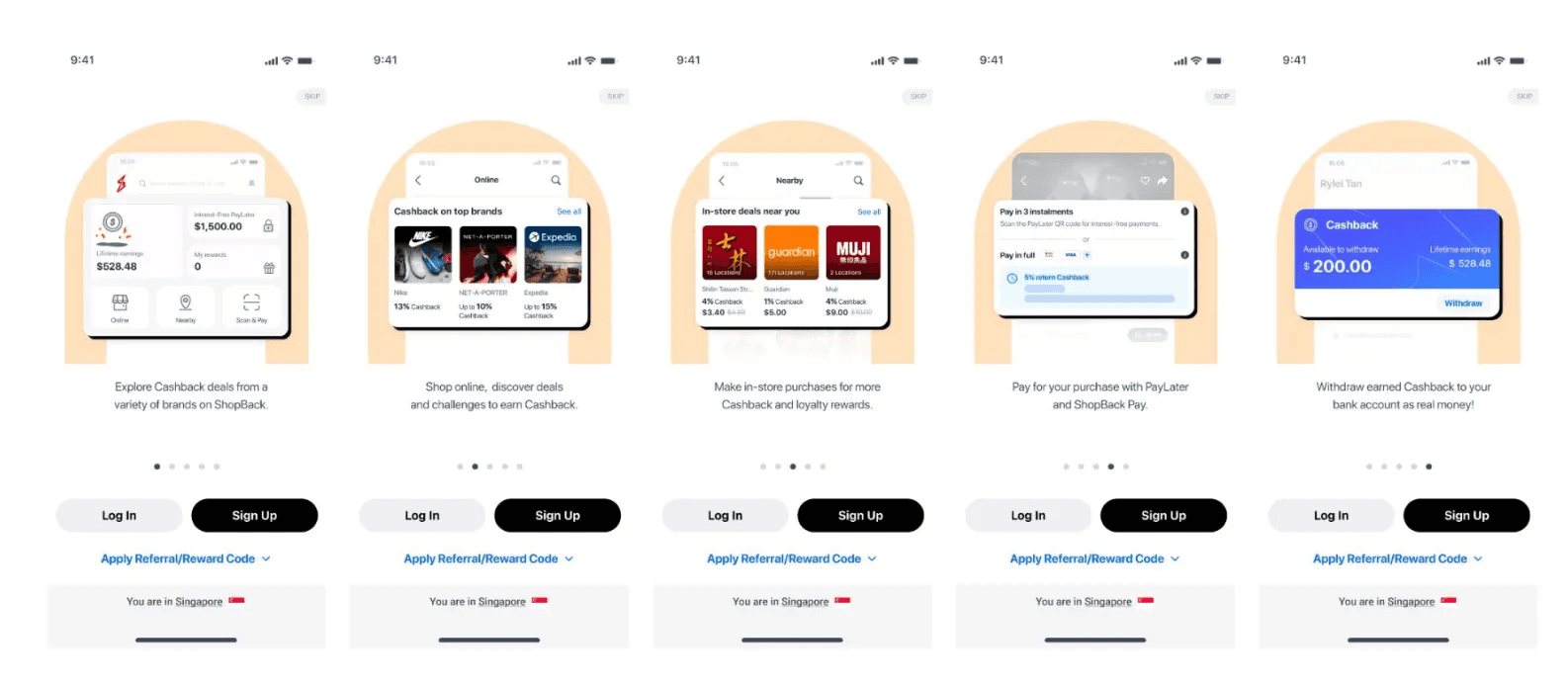
We’ve created a user intent poll to understand (capture intent) and guide user to the relevant screens/flows (show relevant content) based on their selection.

Each option is based on the feature available in their specific market and if required, localised to each market’s primary language.


Results
  • Faster transaction time: In AU, on average users who clicked ‘confirm’ made their 1st transaction in 4 hours compared to 10 hours for users who clicked ‘skip’, which is 167% quicker.

  • Users wants a personalised experience: 76.4% of new customers are willing to share their intent more than skipping the poll.


Experiment 2: Introduce different functionality of the app upfront in a fixed, linear way

Hypothesis

Educating users upfront about all the benefits of the app will encourage them to try it out.

Method of testing: A/B/C

  • Control group A: No changes

  • Treatment group B: Bottom sheet

  • Treatment group C: Popover

Design

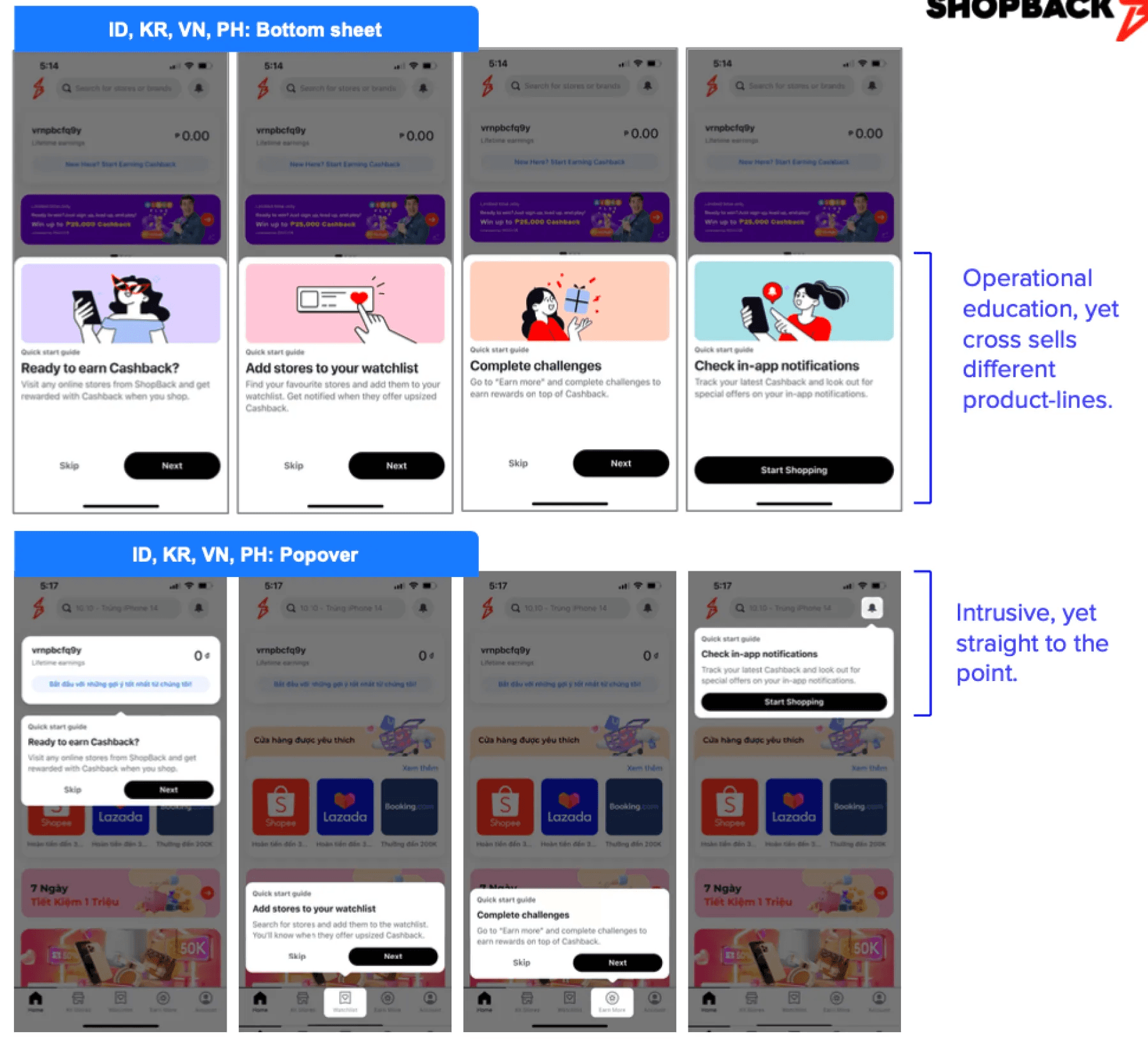
While accessing what are the possible linear ways to onboarding users, we decided to test two ways of onboarding:

Static disclosure, using bottom sheet

vs

Progressive disclosure, using popovers.

This allowed us to allow test whether contextual information on a page itself, is indeed effective.


Results
  • Having a consistent onboarding component has increased the average of conversion rate of watchlist and challenges: In both experiment, we see an increase in % of users adding brands to their watchlist and % of users opting into challenges.


Experiment 3: Motivate discovery of the different app features progressively

Hypothesis

Showing a progress of user’s education and allowing them re-entry into education encourages them to try it out.

Method of testing: A/B

  • Control group A: No changes

  • Treatment group: Progressive bar

Limitation

❌ Motivate users without using monetary incentives.


Design

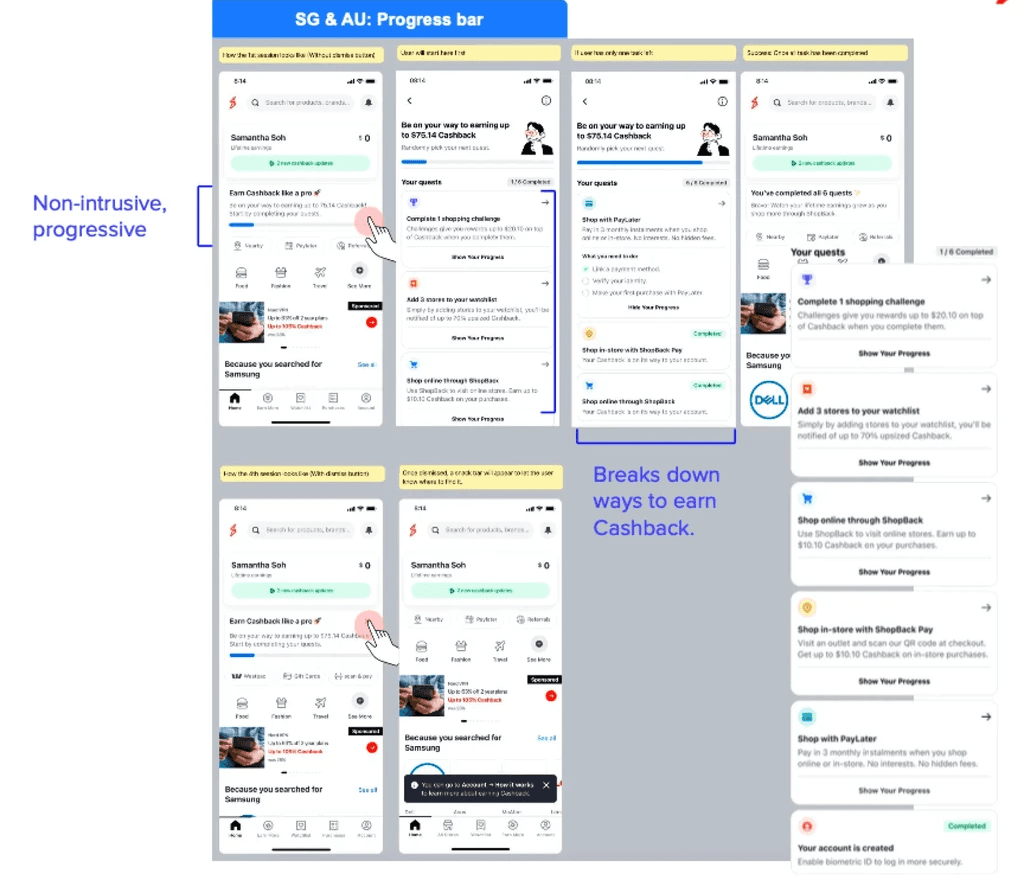
Create a progress bar for the user to keep track of how to earn cash back with ShopBack. In this manner, users are not only learning how to earn money but they are also learning about the features on ShopBack.


Results
statistically significant impact on:

  • +15% Overall Online affiliate conversation rate

  • +24% Watchlist (feature) adoption

  • +54% Challenge (feature) adoption

Run three experiments to increase user engagement and educate users on ShopBack’s features

Experiment 1: Collect user’s intent to show relevant flows dynamically

Hypothesis

Showing relevant screens based on user’s intent will optimise the time taken for them to make their first transaction.

Method of testing: A/B

  • Control group: Does not see poll screen

  • Treatment group: Sees poll screen


Design

We’ve created a user intent poll to understand (capture intent) and guide user to the relevant screens/flows (show relevant content) based on their selection.

Each option is based on the feature available in their specific market and if required, localised to each market’s primary language.


Results
  • Faster transaction time: In AU, on average users who clicked ‘confirm’ made their 1st transaction in 4 hours compared to 10 hours for users who clicked ‘skip’, which is 167% quicker.

  • Users wants a personalised experience: 76.4% of new customers are willing to share their intent more than skipping the poll.


Experiment 2: Introduce different functionality of the app upfront in a fixed, linear way

Hypothesis

Educating users upfront about all the benefits of the app will encourage them to try it out.

Method of testing: A/B/C

  • Control group A: No changes

  • Treatment group B: Bottom sheet

  • Treatment group C: Popover

Design

While accessing what are the possible linear ways to onboarding users, we decided to test two ways of onboarding:

Static disclosure, using bottom sheet

vs

Progressive disclosure, using popovers.

This allowed us to allow test whether contextual information on a page itself, is indeed effective.


Results
  • Having a consistent onboarding component has increased the average of conversion rate of watchlist and challenges: In both experiment, we see an increase in % of users adding brands to their watchlist and % of users opting into challenges.


Experiment 3: Motivate discovery of the different app features progressively

Hypothesis

Showing a progress of user’s education and allowing them re-entry into education encourages them to try it out.

Method of testing: A/B

  • Control group A: No changes

  • Treatment group: Progressive bar

Limitation

❌ Motivate users without using monetary incentives.


Design

Create a progress bar for the user to keep track of how to earn cash back with ShopBack. In this manner, users are not only learning how to earn money but they are also learning about the features on ShopBack.


Results
statistically significant impact on:

  • +15% Overall Online affiliate conversation rate

  • +24% Watchlist (feature) adoption

  • +54% Challenge (feature) adoption

Outcome

Outcome

Outcome

  • 67% Uplift in engagement rate

  • 21% Average uplift in feature opt-in

Key Learning

Key Learning

Key Learning

Honour user’s time

Understanding users' needs and then showing relevant information drives engagement, which in turn affects how users interact with your product.

Honour user’s time

Understanding users' needs and then showing relevant information drives engagement, which in turn affects how users interact with your product.

Create a free website with Framer, the website builder loved by startups, designers and agencies.